
TradingView Watchlist Limit: How Many Lists on the Free Plan

A TradingView watchlist holds 30 symbols on the free Basic plan and 1,000 on every paid plan from Essential to Ultimate, and Basic gets one list where the paid plans print no cap. The table below carries those rows from the comparison TradingView publishes, with flag colours, alert counts and alert lifetimes, and the sections after it settle which plan you need.
Key takeaways
- One watchlist holds 30 symbols on the free Basic plan and 1,000 on Essential, Plus, Premium and Ultimate alike. Paying more than the cheapest paid plan buys no extra symbols.
- Basic is limited to a single watchlist. Every paid plan carries a check rather than a number in that row.
- Flagged symbol colours drop from seven to one on Basic, which removes the grouping method most watchlist routines are built around.
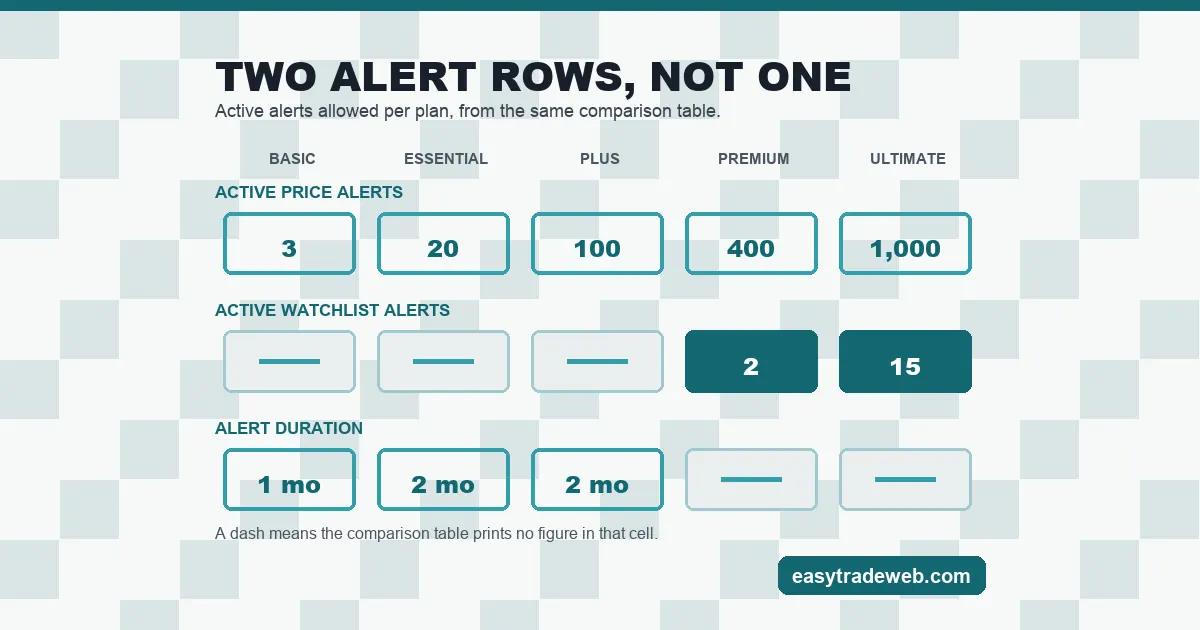
- Watchlist alerts are metered separately from price alerts. The table prints a number for them on only the top two plans, at 2 and 15, while price alerts start at 3 on Basic.
- Alert lifetime is a plan feature too: one month on Basic, two months on Essential and Plus, and no month figure at all on the top two plans.
Table of contents
- What a Watchlist Is on TradingView, and What It Is Not
- The Symbol Cap: 30 on Basic, 1,000 on Every Paid Plan
- Flagged Colours and Sections: What Basic Cannot Do
- Watchlist Alerts Are Not Price Alerts
- Import, Export and What Moves Between Accounts
- How Many Symbols a Real Session Needs
- When a Watchlist Is the Wrong Tool
- Which Plan Your Watchlist Setup Requires
- Frequently Asked Questions
The watchlist and alert rows of the plan comparison TradingView publishes, read on 27 August 2026:
| Row in the plan table | Basic | Essential | Plus | Premium | Ultimate |
|---|---|---|---|---|---|
| Symbols per watchlist | 30 | 1,000 | 1,000 | 1,000 | 1,000 |
| Number of watchlists | 1 | — | — | — | — |
| Flagged symbol colours | 1 | 7 | 7 | 7 | 7 |
| Active price alerts | 3 | 20 | 100 | 400 | 1,000 |
| Active watchlist alerts | — | — | — | 2 | 15 |
| Alert duration | 1 month | 2 months | 2 months | No month figure | No month figure |
A dash means the plan comparison prints no figure in that cell.
Whether a subscription is worth paying for also turns on charts, data, indicators and on which firms connect to it for order placement, and that side is covered on our page on the brokers that connect to TradingView.
What a Watchlist Is on TradingView, and What It Is Not
A watchlist is a saved list of symbols with a live quote beside each one. Clicking a row loads that symbol into the chart. It is a navigation device and a quote board, and on the wider TradingView platform it sits alongside the screener and the alert system rather than replacing either.
Three things it is not. It is not a filter: the screener searches the market against conditions, while a watchlist only shows what you put in it. It is not a portfolio: quantities, cost basis and profit belong to a separate portfolio feature with its own plan limits. And it is not storage that follows you to a broker terminal, which matters more than it sounds and is covered further down.
That distinction decides which limit you meet first: treat the list as a quote board and the symbol cap binds, treat it as a filter and the alert limits bind instead.
The Symbol Cap: 30 on Basic, 1,000 on Every Paid Plan
The plan comparison table gives the symbols-per-watchlist row five values, one for each plan: 30 on Basic, then 1,000 on Essential, 1,000 on Plus, 1,000 on Premium and 1,000 on Ultimate.
That line settles two questions at once. The free ceiling is thirty symbols, roughly the major and minor currency pairs plus two metals with nothing left over. And the paid ceiling never moves: Essential, the cheapest paid plan, gives the same 1,000 symbols per list as the most expensive one.
The count of lists behaves differently from the count of symbols. Basic shows a 1 in the number-of-watchlists row; every paid plan shows a check mark instead of a figure. So the free account gets one list of up to thirty, and a paid account gets an uncapped number of lists of up to a thousand each.
This is the same shape of limit that separates platform tiers generally, and it is worth reading beside the terminal you actually place orders in, since MetaTrader 4 and MT5 impose no comparable ceiling on the Market Watch list at all.
Flagged Colours and Sections: What Basic Cannot Do
Flagging marks a symbol with a colour so that related instruments read as a group without being separated into different lists. The plan table sets the number of flag colours at 1 on Basic and 7 on each of the four paid plans.
One colour is not a smaller version of seven. With seven, a list of sixty symbols carries a colour for majors, another for crosses, another for indices, and stays readable. With one, flagging becomes a bookmark: a symbol is either marked or it is not, and further grouping means splitting the list. Splitting the list is what a Basic account cannot do, because it has only one.
Sections are the other grouping method, letting a list carry labelled dividers between blocks of symbols. With the colour limit alongside, the free plan supports one flat list with one mark, and a routine needing two categories visible at once needs a paid plan whatever its symbol count.
Watchlist Alerts Are Not Price Alerts
The alerts block of the same table separates three things that are often discussed as one. The price-alert row runs 3, 20, 100, 400 and 1,000 across the five plans. A second row, covering alerts attached to an indicator, a strategy or a drawing, prints a figure on the four paid plans only: 20, 100, 400 and 1,000. The watchlist-alert row prints a figure on the top two plans alone, 2 and 15.
So an alert attached to a whole watchlist is a much scarcer resource than one attached to a single price. Being told that alerting is included from the free plan onward is true of price alerts and misleading about watchlist alerts.

Alert lifetime is metered as well. The alert-durations row reads one month on Basic, two months on Essential and Plus, and no month figure on Premium or Ultimate, matching the separately listed feature for alerts that do not expire.
None of that touches the question of when an alert actually fires, which is a separate mechanism entirely and is covered in detail in our page on how alert frequency settings behave. The plan table sets how many alerts you may hold and for how long. It says nothing about what makes one trigger.
Import, Export and What Moves Between Accounts
Import and export appear as their own row under the watchlist block rather than as a universal feature, which is the answer to the most common question about moving a list between accounts: it is a plan capability, not a file format everybody has.
Two consequences follow. A list built on a free account is not portable by any supported route. And a list is not a broker object: connecting a broker to the chart does not push the watchlist into the broker terminal, because the list belongs to the charting account and the order ticket belongs to the broker. A trader who works the same symbols in cTrader or in MetaTrader maintains that list twice, by hand.
Custom columns and sorting sit in the same block and behave the same way, as a paid capability rather than a setting.
How Many Symbols a Real Session Needs
The thirty-symbol cap only matters against a real number, and the number is easy to build without guessing.
Start from the instruments actually traded. The seven major pairs are seven. The crosses built from the same seven currencies without the dollar number twenty-one, because seven currencies pair off in twenty-one ways. That is twenty-eight. Gold and silver make thirty, which is the Basic cap exactly, with nothing left over.
So the standard forex board already fills the free list. Anything a session accumulates around it pushes past the ceiling: a dollar index, two or three equity indices read for risk direction, an oil contract, or a few symbols carried only for context.
The honest test is not how many symbols you trade. It is how many you want visible at once without switching lists, because switching lists is the thing a single-list account cannot do.
When a Watchlist Is the Wrong Tool
A watchlist answers what is happening to these named symbols right now. Two common jobs are a poor fit for it.
The first is discovery. Finding instruments that match a condition, rather than watching ones already chosen, is the screener job, and building an ever-longer watchlist to approximate it wastes the symbol allowance on candidates that were never going to be traded.
The second is record keeping. A watchlist holds no entry price, no size and no result, so tracking open positions in one produces a list that looks informative and records nothing.
Which Plan Your Watchlist Setup Requires
The three questions below are read against the plan table near the top of this page, which holds the watchlist and alert values from the published comparison, read on 27 August 2026.
Which one applies to you follows from three questions, in this order. Do you need more than one list, or more than thirty symbols in it? If yes, Basic is ruled out, and the cheapest paid plan already gives the full 1,000 symbols and seven colours, so there is no watchlist reason to go higher.
Do you need alerts that outlive two months? That rules out Essential and Plus. Do you need an alert attached to a whole list rather than to a single price? Only the top two plans print a figure in that row, and one of them prints 2.
Anything beyond those three questions is a decision about charts, data or indicators rather than about watchlists, and should be priced on that basis.
Frequently Asked Questions
How many symbols can one TradingView watchlist hold?
Thirty on the free Basic plan and 1,000 on Essential, Plus, Premium and Ultimate. The paid figure is the same on all four, so a more expensive plan does not buy a longer list.
How many watchlists does a free TradingView account get?
One. The number-of-watchlists row of the plan comparison prints a 1 against Basic and a check mark rather than a figure against each of the four paid plans.
Do watchlist colours work on the free plan?
Only one colour is available on Basic against seven on every paid plan. A single colour marks a symbol but cannot group symbols, so colour-based grouping is effectively a paid capability.
Can a TradingView watchlist be exported and imported?
Import and export is listed as a plan capability in its own row of the watchlist block rather than as a feature every account has. It is also not a broker function, so connecting a broker does not move a list into the broker terminal.
Are watchlist alerts the same as price alerts?
No. They are separate rows with separate limits. Price alerts run from 3 on Basic up to 1,000 on Ultimate, while a number for watchlist alerts is printed on only the top two plans, at 2 and 15.
This page describes platform features and subscription limits. It is educational and is not investment advice, a recommendation to trade any instrument, a performance claim or a prediction. Plan contents and prices are set by the provider and change without notice. Leveraged trading carries a high risk of losing money rapidly.