
MetaEditor Explained: Source Files, Compiling and Limits

A trader who has just bought an expert advisor opens MetaEditor, goes looking for the file, and finds nothing to open. Nothing is broken. The editor works on one kind of file and the platform runs another, and the guides to MetaEditor describe its features at length without ever saying which file is which. This page starts there, with every rule checked against the MetaQuotes documentation rather than carried over from another tutorial.
Key takeaways
- MetaEditor opens and compiles source files – mq4, mq5 and mqh. The platform runs the compiled result, ex4 or ex5, and the two are not interchangeable.
- A robot bought or sent by a developer normally arrives compiled only. The vendor documents that the executable format conceals the algorithm and resists decompilation, so the editor has nothing to display.
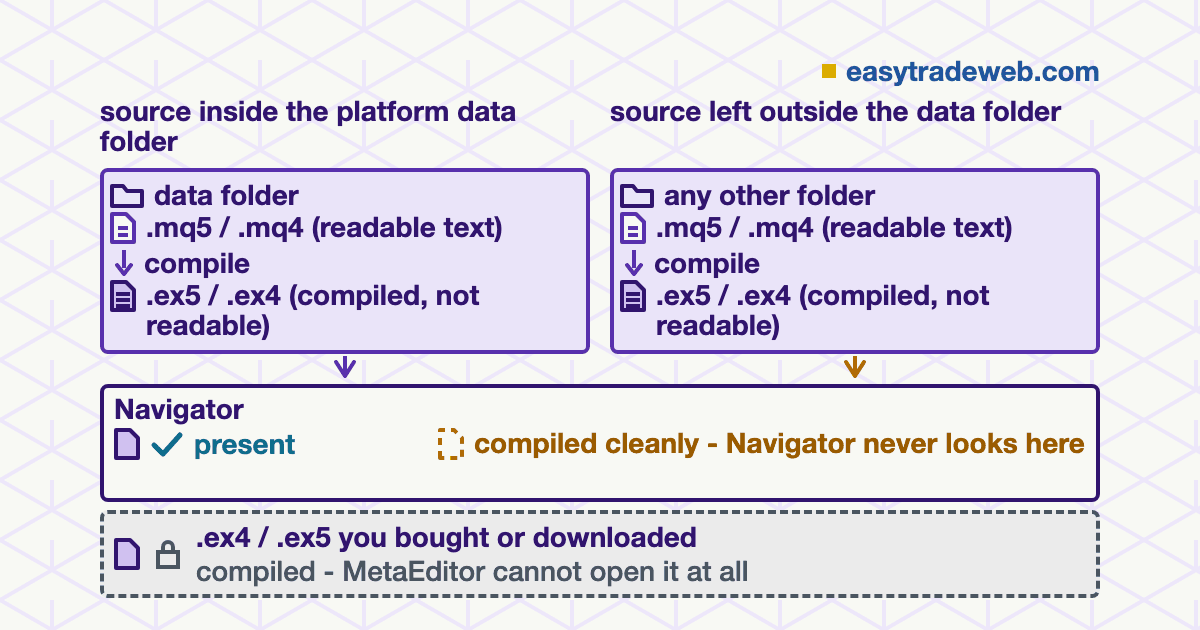
- Compiling writes the executable beside the main source file, which is why a file edited outside the platform data folder compiles cleanly into a place the platform never looks.
- Errors stop the executable being written at all. Warnings do not, so a program can compile and still be wrong.
- Most people who open MetaEditor do not need it. They need the data folder, and the route there is the File menu.
Table of contents
- What MetaEditor Is, and What It Is Not
- Source Files and Compiled Files Are Different Things
- Why a Purchased Robot Usually Cannot Be Opened
- Where the Files Have To Sit for the Platform To See Them
- Compiling, and What the Errors Actually Mean
- Reading Code You Did Not Write, Before It Trades
- Who Does Not Need MetaEditor At All
What MetaEditor Is, and What It Is Not
MetaEditor is the development environment that ships with the MetaTrader terminals. It writes MQL4 and MQL5 programs, turns them into files the terminal can run, and provides a debugger and a profiler for checking them.
It is a separate application, installed alongside the platform, and it opens from a desktop shortcut, from the metaeditor executable in the installation directory, or from the terminal itself when a program is selected in the Navigator.
What it is not is a second trading window. No order passes through it and no quote arrives in it, and nothing done inside it reaches an account until the compiled result is attached to a chart in the terminal. The editor behaves the same way on both platforms, compared separately in MT4 against MT5.
Source Files and Compiled Files Are Different Things
Two families of file are involved and almost every difficulty with the editor comes from treating them as one. A source file carries the program as text a person can read: mq5 or mq4 for a program with a starting point of its own, mqh for shared code other programs pull in. An executable file, ex5 or ex4, is what the compiler produces, and it is what the terminal actually loads.
The conversion runs one way. Source becomes executable, and the documentation is explicit that the output format hides the logic and resists being turned back into readable code. That single fact decides most of what follows on this page, including which files are worth asking a developer for. It also explains why installing a custom indicator works with either family, while inspecting one needs the first, which is also the only place to settle how often an indicator recalculates.
| Extension | What it holds | Readable in MetaEditor | Runs in the terminal |
|---|---|---|---|
| mq5 / mq4 | A complete program as text, with the functions the platform calls to start it | Yes, and it is the only family that can be compiled into a working program | No, not until it is compiled |
| mqh | Shared code pulled into other programs rather than run by itself | Yes, and it can be compiled, but no executable comes out of it | No |
| ex5 / ex4 | The compiled program in a form built for the machine, not for a reader | No | Yes, and this is the file the platform loads |
Why a Purchased Robot Usually Cannot Be Opened
A developer is free to hand over the executable on its own. MetaQuotes documents that ex4 and ex5 files can be distributed with no source files beside them, and adds that debugging is impossible once they are, which is a plain statement of what the recipient is giving up. Products bought through the Market arrive that way, and so do most robots sold privately.
The behaviour that confuses people follows from it. Selecting a program in the terminal Navigator and choosing Modify launches the editor and opens that program, but only where a source file exists for it. Where one does not, the editor opens empty, and no setting or reinstallation changes that.
There is no route around it either. The compiler writes the executable in a form designed to keep the algorithm out of view, and the vendor states that programs built this way are protected against decompilation.
Tools that claim to recover the source of an ex4 are working against that design, and what they return is not the file the author wrote. The practical answer is to ask for the source before buying, and to read a refusal as a decision about inspection.
Where the Files Have To Sit for the Platform To See Them
Everything the terminal will run lives in one directory, named MQL5 on MetaTrader 5 and MQL4 on MetaTrader 4, and the way in is Open Data Folder in the File menu of either application. Inside it, files are separated by purpose: Experts holds robots, Indicators holds indicators, Scripts holds scripts, Include holds shared headers, and Files, Libraries, Logs and Presets hold what their names say. That directory is also the one that has to travel when moving MT4 to a new computer, because a reinstall replaces the program and not its contents.
The rule that catches people is where a compiled file appears. The compiler writes the executable into the same folder as the main source file it was built from. Compile a robot sitting on the desktop and the ex5 lands on the desktop beside it, with no error of any kind, and the Navigator, which reads only the data folder, never lists it.
The file is fine. It is in the wrong place. That is also the first thing to check before blaming a conflict between two robots, a case set out in running more than one expert advisor against one account.
Compiling, and What the Errors Actually Mean
Compilation is started with F7 or the Compile command, and its output appears on the Errors tab of the Toolbox at the bottom of the window. The distinction that matters there is between the two kinds of message the tab reports.
An error stops the process: no executable file is produced at all, so the terminal keeps running whatever version it already had. A warning does not stop it. The executable is written, the program runs, and the thing the compiler flagged is still in it.
A second cause of an empty result has nothing to do with errors. Any source file can be sent through the compiler, but only a main program file – one carrying the functions the platform calls to start and stop it – produces something runnable. Compiling a header on its own reports success and creates nothing. When a robot behaves as though an edit never happened, the Experts log shows which file the terminal actually loaded.
Reading Code You Did Not Write, Before It Trades
The editor is the only place where a program can be examined before it is given an account, and it can only examine the source family. That turns an apparently technical question into a decision made at the point of download: with the source, the logic can be read; without it, the program is accepted on the reputation of whoever supplied it.
Reading it does not require writing MQL. Three things are legible to a careful non-programmer: what the program writes to disk or reads from it, whether it calls outside libraries rather than staying inside the language, and what its inputs actually control.
None of that certifies a program as safe, and no reading substitutes for backtesting a strategy on the account settings it will really run under. The alternative to reading is trust, which is worth naming as a choice.
Who Does Not Need MetaEditor At All
Most people who go looking for it. A trader installing an indicator or a robot that arrived as a file needs the data folder, the right subfolder inside it and a refresh of the Navigator, and none of those steps involves the editor. A trader changing an input value needs the properties window on the chart, and one whose robot will not appear needs the folder check above, not a compiler.
MetaEditor earns its place in three cases: writing a program, changing one whose source is available, or inspecting one before it is trusted.
Before deciding the editor is at fault, work through four checks in order. Confirm which file you hold, source or compiled. Open the data folder from the File menu and confirm the file sits in the subfolder matching its type.
If the file is source, compile it and read the Errors tab rather than assuming success. Then refresh the Navigator in the terminal and look for the program by name, because that list, not the editor, is what proves the platform can see it.
Sources checked 13 August 2026. MetaQuotes, MetaEditor Help, Compilation. MetaQuotes, MetaEditor Help, MetaEditor environment folders. MetaQuotes, MetaEditor Help, Developing programs. MetaQuotes, MetaEditor Help, Launch. MetaQuotes, MetaEditor Help, Workspace.
Disclaimer: This page explains how a software tool that ships with a trading platform works, for educational purposes. It is not investment advice and not a recommendation to trade any instrument or to use any automated system. Trading leveraged products carries a high risk of losing money rapidly.