
MetaTrader Custom Indicators Guide

By: EasyTradeWeb Editorial Team. This content is educational, not financial advice. Forex and derivatives trading carries high risk and may result in loss of capital.
Introduction
MetaTrader is one of the most widely used trading platforms in the forex market, available in two main versions: MT4 and MT5. The platform ships with a set of ready-made built-in indicators, but many traders look for extra analysis capability, and that is where custom indicators come in. Some widely discussed tools are only ever available this way, among them an indicator MetaTrader does not ship at all.
This guide explains, in simple terms: what custom indicators are, how they differ from built-in indicators, how to add them to the platform step by step, and the key tips for using them sensibly and safely without falling for misleading promises.
What Are Custom Indicators in MetaTrader?
A custom indicator is a small program written in MQL4 (for MT4) or MQL5 (for MT5), added to the platform as a compiled file with the extension .ex4/.ex5 (ready to run) or as .mq4/.mq5 (the editable source code).
In simple terms, it is a tool built by programmers or third parties to draw lines or visual signals on the chart, to help a trader read price action differently from what the platform’s basic tools provide.
Built-in Indicators vs. Custom Indicators
- Built-in indicators: come ready inside the platform, such as the Moving Average (MA), the Relative Strength Index (RSI), and MACD. They are reliable and available to everyone with no installation needed.
- Custom indicators: built by outside developers, and may combine several calculations or display data differently. They require manual installation, and their quality and reliability vary widely.
Why Do Traders Use Custom Indicators?
Traders turn to custom indicators for several educational and analytical reasons: trying new ways of viewing price action, combining several readings in a single window, or customizing settings to match their own analysis style.
It’s important to note that most of these tools are, at their core, technical-analysis tools — that is, technical indicators for trading that turn price and volume data into visual signals that make the market easier to read. Understanding the logic behind each indicator matters far more than simply dropping it onto a chart.

How to Install a Custom Indicator in MT4 and MT5 (Step by Step)
- Download the indicator file from a trusted source only (see the security section below).
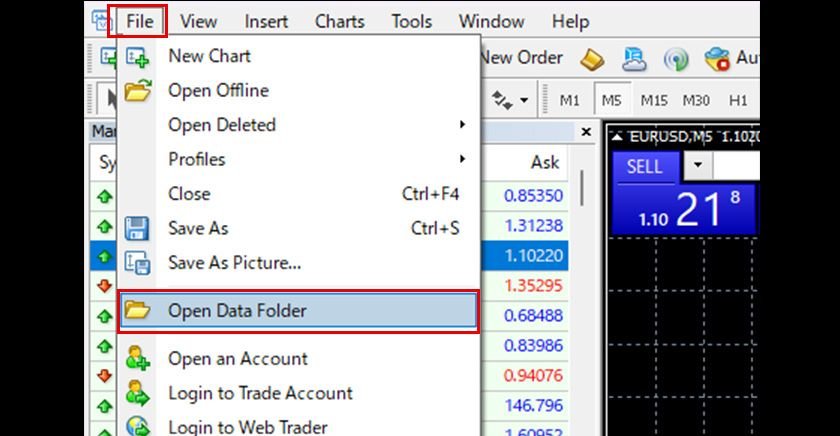
- Open the data folder: from the top menu choose
File, thenOpen Data Folder. - Go to the indicators folder: open
MQL4thenIndicatorsin MT4, orMQL5thenIndicatorsin MT5. - Copy the indicator file (
.ex4/.ex5or.mq4/.mq5) into this folder. - Refresh the platform: restart MetaTrader, or right-click inside the
Navigatorwindow and chooseRefresh. - Apply the indicator: drag its name from the
Navigatorwindow onto the chart, then adjust the settings to fit your needs.
Note: if the indicator doesn’t appear, make sure you placed the file in the correct folder and that you refreshed the platform. A file that arrived as
.mq4or.mq5may also need compiling first, which is what MetaEditor is for.
Common Types of Custom Indicators
- Trend indicators: help read the general market direction (up/down/sideways).
- Momentum indicators: measure the strength and speed of a move.
- Oscillators: show overbought or oversold zones within a defined range.
- Volume indicators: display trading activity linked to price movement.
Each type offers a different angle on the market, and combining them thoughtfully works better than relying on a single tool. Once a combination is arranged the way you want it, save the chart as a template so the same set lands on any other chart.
Tips for Using Custom Indicators Safely
- Don’t rely on a single indicator: indicators are reading aids, not a buy-or-sell decision on their own.
- Always test on a demo account first: before using any indicator on a live account.
- Watch out for misleading promises: any indicator that claims “signals that never lose” or “guaranteed profits” should be treated with extreme caution — no tool can guarantee a market outcome.
- Understand the logic before you use it: know what the indicator calculates and why, instead of treating it as a black box.
Security: Where to Download Indicators From
Custom indicators are, ultimately, executable files, so download them only from trusted, well-known sources. Avoid files from unknown origins, and never grant any tool access to a live account before testing it on a demo account and confirming how it behaves.
Conclusion
Custom indicators in MetaTrader are a useful educational and analytical tool when used thoughtfully. What matters most isn’t how many indicators are on your screen, but how well you understand what each one shows and how you fit it into a clear analysis plan. Start with the basics, test on a demo account, and treat every tool as a reading aid, not a source of guaranteed decisions.
Test this indicator without risking capital
Reading about an indicator is not the same as watching it behave on a live chart. A demo account lets you apply the settings above to real market data and see how the signals form before any money is involved.
Open a demo accountAdvertising disclosure: partner link. Easy Trade may receive compensation. Educational content, not financial advice. CFDs carry a high risk of losing your capital.
Disclaimer: This article is for educational purposes only and is not investment advice or a recommendation to buy or sell. Forex and CFD trading involves significant leverage and carries a high level of risk, and may result in the loss of your invested capital. This page may contain affiliate links; EasyTradeWeb may earn a commission at no extra cost to you if you sign up through them. Base your decisions on your own research or by consulting a licensed professional.
Comments are closed.