
MetaTrader WebTrader: What the Browser Terminal Leaves Out

Every large broker offers a MetaTrader terminal that opens in a browser tab, and almost every page describing it says the same thing: no download, any operating system, the whole platform online. What none of them print is the list of what the browser version actually carries, next to the list the desktop version carries.
MetaQuotes publishes both lists, on its own product pages, and the two do not match. This page sets them side by side, and then explains the part that decides whether the browser terminal is available to you at all, which turns out to be a matter for your broker rather than for MetaTrader — the same reason which brokers offer MT5 is a question about server configuration rather than about the software. The same broker-side constraint shapes choosing a broker for MT4, where the platform licence itself is no longer on sale.
Key takeaways
- MetaQuotes publishes 30 indicators, 24 graphical objects, 3 chart types and 9 timeframes for the MetaTrader 5 web platform, against 21 timeframes and more than 80 technical indicators and analytical tools for the MetaTrader 5 desktop platform.
- The current web terminal runs on each broker access server rather than on one shared server, and MetaQuotes states that a firm needs a valid web terminal licence to set it up. Whether a browser terminal exists for your account is therefore a broker decision.
- The MetaTrader 4 web page asserts that its browser version gives up nothing against the installed one, while the same page publishes a four-item feature list carrying no indicator, object or timeframe count anywhere on it.
- No official web platform page lists Expert Advisors, custom indicators or MQL among the web features, while both desktop pages give those their own sections.
- The browser terminal is a full trading interface: MetaQuotes lists every order type, one-click trading from Market Depth, netting and hedging accounts, and two-factor authentication. The gap is in analysis and automation, not in order entry.
Table of contents
- What the Browser Terminal Actually Is
- Whether a Web Terminal Exists at All Is a Broker Decision
- The Published Toolkit: Web Against Desktop
- What MetaQuotes Does Not List for the Web Version
- Parity Claims the Official Feature Lists Do Not Support
- Where the Browser Terminal Is the Right Answer
- Who Should Not Rely on It
- Frequently Asked Questions
What the Browser Terminal Actually Is
The MetaTrader web platform is a trading interface delivered as a web page. Nothing is installed, and the account it opens is the same live or demo account the desktop terminal opens, on the same broker server. MetaQuotes names Chrome, Safari, Edge, Opera and Firefox on macOS, Linux and Windows, and states that the interface is adapted for touch screens.
Order entry is not where the compromise sits. The MetaTrader 5 web page lists the full set of trade orders including pending and stop orders, one-click trading from a chart or from Market Depth, netting and hedging position accounting, and real-time quotes in Market Watch. The corporate page adds support for two-factor authentication.
So the browser version is not a viewer with a buy button bolted on. It places what the terminal places. The difference lies in the analytical and programmable half of the platform, which is also the half that separates MT4 and MT5 from each other in the first place.
Whether a Web Terminal Exists at All Is a Broker Decision
This is the fact that goes missing from every broker page and every comparison article, and it changes how you should read the phrase MetaTrader WebTrader.
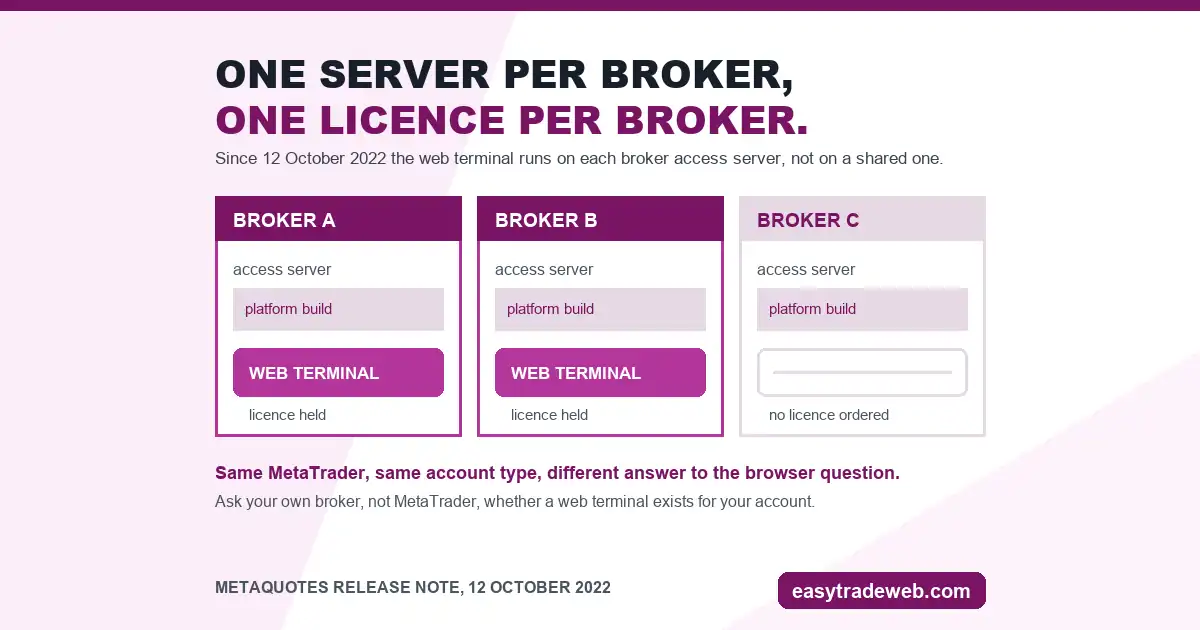
When MetaQuotes released the current web terminal, on 12 October 2022, it described an architectural change rather than a cosmetic one. The terminal moved from one common server to each broker access server, so that what a client opens is an individual web terminal working only with that specific broker platform. The stated reason was security and control for the broker.
The same release note carries the commercial consequence in one sentence: firms holding a valid web terminal licence can set the new version up on their servers without extra fees, and any firm without one has to order a licence through technical support.
Read that as a reader rather than as a broker and it means something simple. The browser terminal is a licensed server product your broker either runs or does not run. It is not a MetaTrader feature that travels with your account, which is why two clients of two different brokers, on identical platform builds, can get different answers to the same question about browser access.
The practical check is therefore never a search for MetaTrader WebTrader in general. It is a look at your own broker platform page for a web terminal link, and, failing that, a question to the broker. The same logic applies to any platform sold as a server product rather than a download, which is how cTrader reaches the browser as well.
The Published Toolkit: Web Against Desktop
Both the web page and the desktop page publish counts. Setting them next to each other is the whole point of this section, because no page that sells the web terminal does it.
| Published figure | MT5 desktop | MT5 web | MT4 desktop | MT4 web |
|---|---|---|---|---|
| Timeframes | 21 | 9 | Not published | Not published |
| Technical indicators | More than 80 tools, graphic objects included | 30 | 30 | Not published |
| Graphical objects | Counted inside the figure above | 24 | 23 | Not published |
| Chart types | Not published | 3 | Not published | Not published |
| Expert Advisors and MQL | Given their own sections | Absent from the feature list | Given their own sections | Absent from the feature list |
Two things fall out of the table. The first is the timeframe count, 9 against 21 on the same platform. A trader who works on the two-hour or the six-hour chart is not looking at a slightly reduced MetaTrader 5, but at a chart set that may not contain the interval being traded.
The second is that the published MetaTrader 5 web toolkit, at 30 indicators and 24 graphical objects, sits almost exactly where the MetaTrader 4 desktop toolkit sits, at 30 indicators and 23 analytical objects. Opening MetaTrader 5 in a browser gives you an MT5 account with roughly an MT4 analysis kit.
What MetaQuotes Does Not List for the Web Version
An absence is weaker evidence than a figure, so it is worth being exact about this one. Across the MetaTrader 5 web page, the MetaTrader 4 web page and the corporate web trading page, the feature lists contain no mention of Expert Advisors, custom indicators, scripts, the strategy tester, the MQL language, or the built-in market of trading applications. Both desktop pages give each of those a heading and several paragraphs.

That pattern is consistent enough to plan around. If an account depends on an Expert Advisor running through the session, the browser is not the surface that keeps it running, and the question becomes where the terminal lives instead: a machine left switched on, or a forex VPS rented for the purpose.
The same goes for a purchased or downloaded custom indicator. It is a compiled file that a terminal loads from a folder on a disk, and a browser tab has no such folder. Templates and profiles saved on a desktop install are a third case in the same family.
None of this makes the web terminal defective. It makes it a different product with a narrower published scope, and that scope is what to check against your own routine.
Parity Claims the Official Feature Lists Do Not Support
Broker pages repeat a parity claim that traces back to MetaQuotes itself, and it is worth reading the original rather than the copies. On the MetaTrader 4 web page the browser version is presented as giving up nothing against the installed one, and the reason offered is that it ships inside the same product rather than as a separate one.
Directly beneath that sentence sits the entire MetaTrader 4 web feature list, and it runs to four items: browser trading, operating-system compatibility, the trading operations themselves, and live quotes in the Market Watch window. There is no indicator count, no object count and no timeframe count anywhere on the page, while the MetaTrader 4 desktop page publishes 30 built-in technical indicators and 23 analytical objects.
The MetaTrader 5 web page makes a softer version of the same claim, offering the widest functionality of the desktop version, and then prints the counts that show what widest means in practice.
Neither statement is false on its own terms. Both are claims about trading operations, and on trading operations the browser terminal genuinely does carry the full set. The reading to avoid is the one broker pages encourage, in which a parity claim about order entry is stretched to cover analysis and automation too. The counts published by MetaQuotes do not support that stretch, and no third-party page found for this article printed them.
Where the Browser Terminal Is the Right Answer
Four situations make the browser version the sensible choice rather than the fallback, and all four are ones where installation is the problem being solved.
A machine you do not control is the clearest. On a work computer, a borrowed laptop or a locked-down desktop, installing software is either forbidden or slow, and the browser needs no permission from anyone.
An unsupported operating system is the second. Readers who have already been through the Wine and virtual-machine routes for running MetaTrader on a Mac know how much setup the alternatives carry, and for an account that is only checked rather than actively traded, that setup buys nothing.
Position monitoring is the third: opening a tab to see a trade, move a stop or close a position sits entirely within the published web feature set. The fourth is a first look at a broker, where a demo account can be driven before deciding whether a full installation is worth the disk space.
Who Should Not Rely on It
Anyone running an Expert Advisor should treat the browser as a monitoring window and nothing more, because a strategy stops when the tab closes and no official page says otherwise.
Anyone whose method sits on a timeframe outside the published nine should check the interval list before assuming the chart will be there, and anyone who trades from purchased custom indicators has no route to load them into a browser tab at all.
The same applies to a trader with a heavily arranged desktop workspace of templates and profiles, since those are files on a disk rather than settings on the account. If any of these describe your routine, an installed terminal on a machine that stays available is the requirement, and the practical routes to one, including MetaTrader on Linux, are worth reading before you decide the browser will do.
Frequently Asked Questions
Can MetaTrader 5 be used in a web browser?
Yes, provided the broker runs a web terminal. MetaQuotes publishes a MetaTrader 5 web platform that opens in Chrome, Safari, Edge, Opera or Firefox on macOS, Linux or Windows with nothing installed, and the interface is adapted for touch screens. The terminal runs on the access server of the broker, so the link comes from the broker rather than from MetaQuotes.
Does the MetaTrader web terminal support Expert Advisors?
The official web platform pages do not list Expert Advisors, custom indicators, scripts, the strategy tester or MQL anywhere in their feature lists, while both desktop platform pages give those topics their own sections. An automated strategy should be planned around an installed terminal that stays running, not around a browser tab.
Is the MetaTrader web platform free to use?
There is no charge to the trader, and no purchase step appears anywhere in the flow. The licence sits on the broker side: MetaQuotes states that a firm holding a valid web terminal licence can set the platform up on its own servers without extra fees, and that a firm without one must order a licence through technical support.
Why can some brokers not offer a web terminal?
Because the current web terminal is a server product rather than a shared service. MetaQuotes moved it from one common server to each broker access server, so every firm installs and runs its own instance and needs the licence that permits it. A firm that has not taken that step has no web terminal to give a client, whatever platform build the client is on.
How many timeframes does the MetaTrader 5 web platform have?
MetaQuotes publishes 9 timeframes and 3 chart types for the MetaTrader 5 web platform, alongside 30 indicators and 24 graphical objects. The desktop platform page for the same product publishes 21 timeframes and more than 80 technical indicators and analytical tools, so the browser chart set is a subset rather than a match.
Risk warning: this page is educational and describes what one trading platform publishes about its own browser version. It is not advice to buy or sell any instrument, it recommends no broker, platform or product, and nothing here is a signal, a performance claim or a prediction. Leveraged trading carries a high risk of losing money rapidly.