
MetaTrader 5 Brokers: What the Broker Sets, Not MetaQuotes

Search for MetaTrader 5 brokers and you get rankings: seven best, six top picks, a directory of logos, each scoring brokers on spreads, instruments and leverage before naming a winner.
None tells you what decides how MT5 behaves on your account: MetaQuotes writes the platform, your broker configures it. The build is the same everywhere; the settings are not. MT5 is also the only one of the two platforms MetaQuotes still licenses to new brokers, which is why MT4 is a legacy platform. This page separates the two layers and gives three checks to run before any deposit.
Key takeaways
- Every broker runs the same MetaTrader 5 software. What differs is the configuration on its trade server, and the platform documentation states those parameters are set by the broker.
- Six of those settings change your cost or your ability to place an order: spread, stops level, execution mode, swap, volume limit and trade mode.
- Commission on a raw-spread MT5 account runs from none to $3.50 per lot per side across the nine brokers below, and one publishes no figure for the company that would serve you.
- Maximum leverage runs from 200x to 1:5000 across the same nine, every figure conditional on account size, instrument or both.
- The company on your client agreement, not the brand, decides which terms apply, and all six settings are readable on a demo before you deposit.
Table of contents
- The Software Is the Same at Every Broker
- The Six Settings Your Broker Controls, Not MetaQuotes
- How to Confirm a Broker Offers MT5 Before You Deposit
- Which Licensed Entity Actually Serves You
- Where the Comparison Sites Contradict Themselves
- Reading the Cost of an MT5 Account as One Round-Turn Number
- Which Figures This Page Does Not State, and Why
- When MT5 Is the Wrong Choice for You
MT5 terms at nine brokers, by the company that signs your agreement
| Broker | Company in the agreement | Commission, lower-spread MT5 account | Maximum leverage | Swap-free |
|---|---|---|---|---|
| Exness | Exness (SC) Ltd | None on one account type; up to $3.50 per lot per side on another | Stated as unlimited, conditional on equity under $5,000 | Applied automatically for certain countries of registration |
| XM | XM Global Limited | Not disclosed; the contract points to a fee schedule in the terminal | Up to 1:1000 | Standard option on all accounts |
| FXTM | Exinity Limited | $3.50 a side, $7 the round turn, on one account; none on another | Up to 1:3000, floating | On some account types, not others |
| Tickmill | Tickmill Ltd | Classic none; Raw $3 a side, $6 the round turn | 1:1000, reducing as position size rises | Classic or Raw can be converted, with a handling fee |
| FBS | FBS Markets Inc. | None charged on trades | 1:3000 in the lowest equity band, falling as equity rises | All live accounts, with a fee |
| IC Markets | Raw Trading Ltd | $3.50 a side, so $7 the round turn | Up to 1:5000 on majors and minors, 0 to 2 lots | Available on Raw Spread and Standard |
| Equiti | Equiti Securities Currencies Brokers LLC | Zero on one account; $3.50 per lot per side on another | Up to 1:500, fixed per instrument | Swap Free Mini account, subject to a size condition |
| Amana | Amana Financial Services (Dubai) Limited holds the DFSA licence; terms are published at brand level | Zero on standard pricing; may apply on raw pricing, amount not disclosed | 25x, 100x or 200x on majors, by account tier | Not disclosed |
| Admiral Markets | Admirals Europe Ltd | $1.80 to $3.00 per lot on currencies and metals, by volume | Not disclosed | Trade.MT5 account only |
Figures verified against each broker’s own published terms on 26 July 2026; the IC Markets commission was re-confirmed on 18 August 2026. Every broker listed ships MetaTrader 5 — the differences above are set by the broker, not the platform.
The Software Is the Same at Every Broker
MetaTrader 5 is written and distributed by MetaQuotes. Brokers license it and run it on their own servers; none receives a modified build. Install MT5 from two brokers and you run one executable against two server configurations. The same holds for cTrader, which Spotware licenses to brokers on the same terms. How MT4 and MT5 differ is a separate question from how two brokers differ.
Almost every published comparison is organised around properties the platform does not own: chart types, timeframes, the strategy tester, the indicator library and the mobile and web terminals come from MetaQuotes, identical wherever you open an account.
What the broker owns is the trade server, and the platform’s own documentation is explicit about it. The symbol specification window is introduced as the set of parameters set by a broker, and the execution section states that the brokerage company decides which mode applies to each instrument.
The useful question is therefore not which broker has the better MT5, but which has configured it in a way that suits how you trade.
The Six Settings Your Broker Controls, Not MetaQuotes
Open Market Watch, right-click a symbol and choose Specification. Everything there is a broker setting, and six change what you pay or whether an order is accepted.
Spread. Listed in points, marked floating where it varies. A per-symbol server setting, which is why the same pair carries different spreads at two brokers running identical software.
Stops level. A band in points either side of the current price. Protective and pending orders cannot sit inside it, and the server refuses one with an invalid stops message. A trader working with tight stops can find a strategy will not run where that band is wide, and nothing signals it beforehand — the mechanics are in stops level and freeze level.
Execution mode. Four exist: instant, request, market and exchange. On the first, your order carries a price and the broker either fills it or comes back with a requote. On market execution the broker fixes the fill itself and sending the order is consent to whatever that turns out to be — the difference is set out in instant versus market execution. Two contracts behind one button, chosen per symbol by the broker.
Swap. The broker picks the calculation method from several the platform supports: in points, in the base, margin or deposit currency, as a percentage of the current or open price, and two variants that close and re-open at a shifted price. It also sets a multiplier per weekday: a base swap of $1.50 with a Wednesday multiplier of three is charged as $4.50 rolling into Thursday.
Volume limit. A cap on the combined size of open positions and pending orders in one direction on one symbol. With a five-lot limit and a five-lot buy position, a further buy limit is refused while a five-lot sell limit is accepted. Not a margin constraint, and invisible until an order fails.
Trade mode. A symbol can be opened both ways, restricted to one direction, limited to closing existing positions, or switched off. The closing-only setting surprises people, because the symbol still appears and still updates.
None of the six is a property of MetaTrader 5. All six belong to the account type you opened, and all are printed in a window you can read before funding it.
How to Confirm a Broker Offers MT5 Before You Deposit
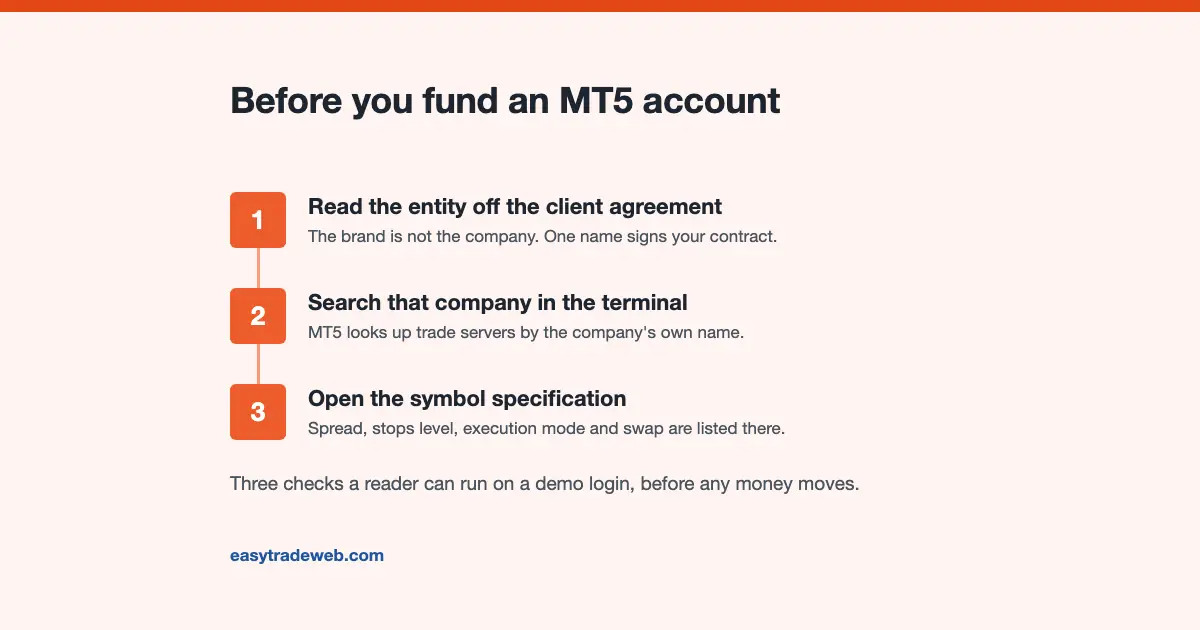
A logo on a marketing page is not confirmation. Brands operate through several licensed companies, and the platform a brand advertises is not always the one the company serving your country runs. Three free steps settle it.
One: read the company name off the client agreement. Not the brand in the header, but the company named as counterparty in the document you accept. That company holds your money, and its regulator takes your complaint.
Two: search that company name in the terminal. MT5’s account-opening dialog searches trade servers by company name, not brand. A company running MT5 appears with its servers listed; one that does not, does not appear. It is the vendor’s own directory, answering what the marketing page was answering for itself.

Three: open a demo on that server and read the symbol specification. Demo servers usually carry the same symbol configuration as live ones, so the six settings are readable in minutes. Check the pairs you actually trade, not EURUSD alone: stops level and trade mode are set per symbol and often differ sharply between majors and the rest.
If the company on the agreement does not appear in that search, the account being offered is not the MT5 account the page advertised.
Which Licensed Entity Actually Serves You
The table lists nine brokers by the company named in the agreement rather than by brand, because the brand determines nothing. Exness trades under at least six licensed companies, XM under four, Tickmill under five. Leverage, protections and the complaint route follow the company, not the logo.
The effect is large. XM’s Belize company is recorded at up to 1:1000, its Dubai company at up to 1:30 and instrument-dependent. Same brand, same platform, same website, differing more than thirtyfold on the single number most readers compare brokers on. A ranking printing one leverage figure beside one brand describes whichever company it happened to look at.
Amana shows the limit of the exercise: its disclosures name five companies, but its platform and pricing pages publish terms at brand level without saying which they apply to. That is recorded above rather than resolved, because resolving it would mean guessing.
Where the Comparison Sites Contradict Themselves
Four MT5 broker pages were read in full while this one was written: the vendor’s directory and three editorial rankings. Between them they carry three contradictions a reader can check.
The highest-ranked editorial guide gives one broker two tradeable-symbol counts, roughly 3,500 in its summary and 7,435 in its comparison data, with no source for either.
A second is stamped updated March 2026 while describing broker testing carried out in September 2026, later than its own update. A third prints four figures for the share of retail accounts that lose money, 74 to 89 per cent, 73.33, 73.7 and 72, with nothing to say which broker or period each belongs to.
These are load-bearing numbers, and none of the four sources any of them. The vendor’s directory is the same: client, country and instrument counts sit beside each broker unattributed. A figure with no source cannot be checked or dated, and so cannot be compared with another broker’s, which is the task these pages claim to perform.
Reading the Cost of an MT5 Account as One Round-Turn Number
Two brokers quoting the same spread can cost different amounts, because a raw-spread account pairs a narrow spread with a commission while a standard account folds it into a wider one. They are comparable only once both are expressed the same way.
The conversion is arithmetic: take the commission per lot per side, double it for the round turn, and add the spread converted into account currency for the same lot size.
On the standard-lot convention one point of spread on one lot is about $10, so a 0.2-point spread with a $3.50 per-side commission is roughly $2 plus $7, around $9 a round turn, against about $11 commission-free at 1.1 points. The narrower quote is not automatically the cheaper account, and the netting and hedging account modes change what a round turn even means.
Three of the nine publish a per-side commission for the company concerned: $3.50, $3.00, and an $1.80 to $3.00 volume-dependent band. One publishes none for the company serving most readers, pointing instead to a fee schedule in the terminal, so the number is not comparable until the account is open.
Which Figures This Page Does Not State, and Why
No spread figure appears in the table. Seven of the nine publish no spread for any named pair, offering instead a claim of the form “from 0.5 points” with no pair, account type or time window. A number without a pair attached is not a spread.
Instrument, client and country counts are absent for the same reason: every such figure in the four comparison pages was unsourced. The minimum deposit is absent for a different reason: it belongs to the account and the legal entity rather than to the platform, and the range one broker publishes across its own accounts is set out in what MetaTrader 5 actually costs to start.
Three cells read “Not disclosed”, and those are findings rather than gaps. A broker that does not publish its maximum leverage, or whether a swap-free account exists, has told you how much checking its other terms need.
When MT5 Is the Wrong Choice for You
MT5 is not right for everyone offered it, and two situations cause most of the mismatch.
If your strategy runs as an MQL4 expert advisor or a compiled MT4 indicator, it will not run on MT5. The two use different programming languages and the code must be rewritten, not converted. Traders who move expecting to bring their tools find this out after funding, and rewriting a working strategy costs weeks.
If you trade one pair with tight stops and hold nothing overnight, most of what MT5 adds over MT4 is inventory you will not use, while the stops level on your server decides whether orders are accepted at all. There the platform version matters far less than the server configuration, and choosing a broker for its MT5 badge optimises the wrong variable.
A third case: if the company serving you is not the one whose terms attracted you, the platform question is premature.
easytradeweb.com may be compensated if you open an account through a link on this page. That does not change the figures above, which come from each broker’s published terms and are dated.
Exness lists MetaTrader 5 among its platforms under Exness (SC) Ltd.
Frequently Asked Questions
Which brokers support MetaTrader 5?
All nine brokers in the table ship MetaTrader 5, and so do most retail currency brokers. Support is close to universal, which is why it is a weak basis for choosing between them. What separates them is how each has configured the platform on its own server.
How do I check that a broker offers MT5 before I deposit?
Read the company name off the client agreement, search that name in the server list inside the MT5 terminal, and open a demo on the server that appears. The platform searches by company rather than brand, so a company not running MT5 will not be listed.
Is MetaTrader 5 different at different brokers?
The software is identical; the configuration is not. Spread, stops level, execution mode, swap calculation, volume limit and trade mode are set per symbol on the server run by the broker, and the platform documentation describes them as parameters set by a broker.
Does MetaTrader 5 cost anything to use?
Brokers supply the terminal to account holders and do not charge separately for it. What you pay is the spread, any commission on your account type, and swap on positions held overnight, all set by the broker.
Which of These Applies to You
If commission is a visible line for you, the round-turn arithmetic decides the account, and the three brokers publishing a per-side figure are the ones you can run it on.
If you trade rarely, that difference is small and what affects you is the stops level and trade mode on your pairs, readable on a demo in minutes and on no comparison page.
Sources checked 2 September 2026: MetaQuotes, MetaTrader 5 Help, Market Watch, for the symbol specification field list, the statement that those parameters are set by a broker, the swap methods and weekday multiplier, the stops level definition and the volume limit example. MetaQuotes, MetaTrader 5 Help, General Concept of Trading Operations, for the four execution modes and the attribution of mode selection to the brokerage company. Table figures and entity names come from each broker’s published terms and regulatory disclosures in this site’s broker verification log, captured 26 July 2026, IC Markets re-confirmed 18 August 2026.
Disclaimer: This article is educational only and is not investment advice, and it is not a recommendation of any broker or platform. Trading leveraged products carries a high risk of losing money rapidly. Costs, leverage and protections depend on the account you hold and on the regulator of the company holding it, and the figures here are dated readings rather than current quotes. Verify current terms with your provider and its regulator before funding an account, consider your objectives and, if needed, seek independent advice.