
Auto Trendline Channel Indicator

- A highly effective, powerful, and free indicator
- Draws trend lines
- Correctly identifying the trend is one of the basics of chart reading, and it can help inform your trading decisions
- Useful across all currency pairs and timeframes
- Compatibility: MetaTrader 4
Trading with the trend-line and price-channel indicator is one way traders read market structure. This indicator’s job is to help identify the current trends and price channels on the chart, which supports trading in the direction of the market instead of against a sideways range, and helps clarify the market’s current direction. You may also want to read about Trend Strength Indicator for MetaTrader.
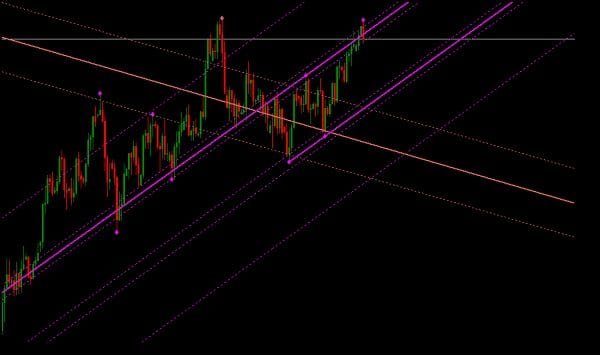
The Auto Trendline & Price Channel Indicator is a MetaTrader 4 indicator that scans the chart, identifies trend lines and price channels, and plots them automatically.
If you often rely on trend lines and price channels in your daily trading, this indicator makes them easier to work with and reduces the need to identify and draw the lines manually every time.
It only displays the trend lines and price channels it considers the most realistic and strongest, so a line is removed from the chart once price is no longer expected to react to it.
The indicator does not redraw itself, but it can change the angle of the lines when new extreme points appear, and it is best suited to short- and medium-term forex trading.
The optimal timeframes to use it on are H1 and M15. Trend lines and price channels are considered a basic analysis tool, so the indicator is compatible with any other indicator or trading system.

If you are a beginner trader, this indicator can help you understand what a trend line and a price channel actually are, and by watching how it works you can learn how to draw trend lines and price channels yourself.
For more experienced traders, the indicator suggests trend-line and price-channel options and can also save time when setting them up.
How the Auto Trendline & Price Channel Indicator Works
First, it helps to know that this indicator scans all timeframes on the chart and identifies every possible trend line and price channel. It then applies a few approximate filters that exclude more than half of the lines and channels found. After that, it checks the quality of the remaining elements and displays the trend line and price channel it rates best on the chart.
After you install the indicator, you will see that the trend lines are made up of two types: solid lines and dotted lines.
A stop-loss order can be placed below the lowest price low within the trend line’s range, and a take-profit order can be placed at the highest price high reached at the time the trend line is broken; the opposite logic can be applied to sell trades in the same way. Price does not always react as expected, and any signal from the indicator can fail.
Disclaimer: This article is for educational purposes only and is not investment advice. Trading forex and CFDs on margin carries a high level of risk and may not be suitable for all investors. Past performance and any indicator signal are not a guarantee of future results, and you should test any tool on a demo account before using it on a live account. Some links on this page are affiliate links, and we may earn a commission if you sign up through them at no extra cost to you.