
MT5 Netting vs Hedging: One Position Per Symbol or Many?

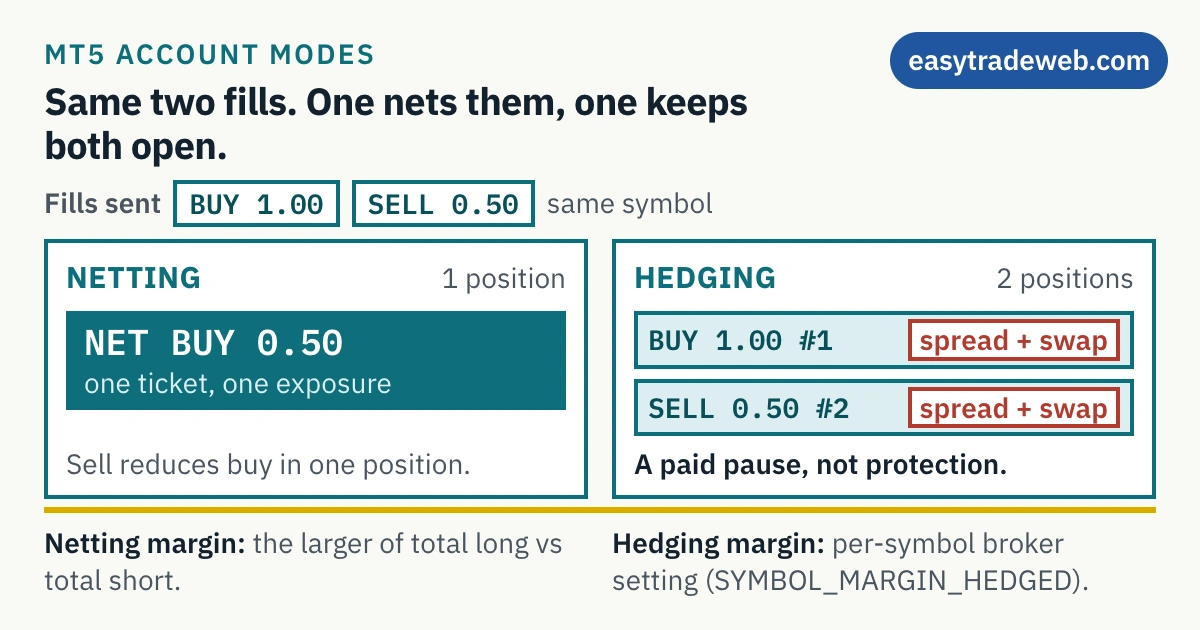
On MetaTrader 5, netting means an account holds only one position per symbol: a deal in the opposite direction reduces, closes or reverses it. Hedging means every deal opens a position of its own, so several positions on one symbol, including opposite ones, can sit open together. The mode is a property of the account, chosen by the broker, never by the trader.
Two MetaTrader 5 accounts at the same broker, on the same symbol, therefore behave completely differently when you place a sell order while a buy is open. One reduces the position you already have. The other opens a second one beside it.
That difference is not a setting in the terminal and not something you choose per trade. It belongs to the account, and most explanations of it stop at the description without saying what it costs you or where the rule comes from. Where the account is being opened to run an automated strategy rather than to trade by hand, the same property becomes the first thing to check when choosing an account for an automated strategy.
What follows covers what each system does to your orders, how opposing positions are margined, what breaks in automated code, and why one jurisdiction removes the choice entirely.
Key takeaways
- Netting allows only one position per symbol. An opposite deal decreases it, closes it, or reverses it.
- Hedging opens an additional position for every fill and leaves the existing one untouched.
- The system is a property of the account, exposed to code as the account margin mode, not a terminal preference you can toggle.
- Hedged margin is a per-symbol setting your broker controls. Under one documented method the platform ignores it and margins the larger side instead.
- Holding both directions is not free protection. Net exposure is zero while both legs keep paying spread and swap.
- US retail forex accounts cannot carry offsetting positions at all. NFA Compliance Rule 2-43(b) requires them to be offset first in, first out.
Table of contents
- What a Position Accounting Mode Actually Is
- Netting: One Position Per Symbol
- Hedging: Every Fill Is Its Own Position
- How Margin Is Charged on Opposing Positions
- Why an Opposite Position Is Not Free Protection
- What Changes for Expert Advisors and MQL5 Code
- Why US Retail Accounts Cannot Hold Both Sides
- Choosing a Mode You Cannot Change Later
- Frequently Asked Questions
What a Position Accounting Mode Actually Is
The same distinction surfaces in the account export, which is why how deals and positions appear on a statement is worth reading alongside this.
A position accounting mode is the rule the platform uses to turn your executed deals into positions. It sits between the fill and what you see in the terminal.
MetaTrader 5 documents two systems for this on retail accounts, netting and hedging, and it treats them as properties of the account rather than as options inside a trading session.
The MQL5 account properties make that explicit. An account exposes a margin calculation mode, and the retail values describe netting as a mode in which no more than one position exists for a symbol, and hedging as one in which multiple positions can exist for one symbol.
Two consequences follow immediately. The mode is the same for every symbol you trade on that account, and it is not something the terminal lets you switch between while trading. It is also why two account types at the same broker behave differently.
Netting: One Position Per Symbol
Under netting, the MetaQuotes help describes a single combined position per symbol at any one time. Everything you do on that symbol is folded into it.
When a deal executes against an existing position, the documented outcomes are three: the position shrinks by the incoming volume, it closes outright where the two volumes match, or it flips to the other direction where the incoming deal is the larger.
Reversal is the case that surprises people. A sell of two lots against an open buy of one lot does not leave you with a buy and a sell. It leaves you short one lot, and the original position no longer exists.
The practical effect is a single line in the terminal with a single average entry price, a single stop loss and a single take profit. Adding to a winner changes the average price rather than creating a second entry to manage separately.
For anyone thinking in terms of net exposure, what the account shows is what the account is carrying.
Hedging: Every Fill Is Its Own Position
Under hedging, the documentation permits several open positions on a single symbol, opposite ones among them.
The behaviour on a new deal is the mirror image of netting. Where a position is already open on the symbol and another deal executes, whether a market order filled or a pending order triggered, the platform adds a fresh position and leaves the existing one exactly as it was.
Each of those positions carries its own volume, its own entry price and its own protective orders. You can close one and leave another running, which is what makes staged entries and partial exits straightforward to manage. What the platform leaves behind when you do that, including the protective levels, is set out in closing part of a position.
The cost is bookkeeping: four positions on one symbol produce four rows and one net exposure the terminal does not state for you.
| Netting | Hedging | |
|---|---|---|
| Positions per symbol | One | Any number, in either direction |
| An opposite deal | Decreases, closes or reverses the existing position | Opens an additional position, leaving the first unchanged |
| Stops and targets | One set, on the combined position | One set per position, managed separately |
| Entry price shown | A single average across everything added | The actual fill price of each position |
| Net exposure | Displayed directly | You work it out yourself |
How Margin Is Charged on Opposing Positions
This is where the surveyed explanations stop at may vary. The rule is documented, and it is a per-symbol setting rather than a platform behaviour.
MetaQuotes describes hedged margin as a margin calculation condition that becomes available in the hedging system. The MQL5 symbol properties define the value itself as the contract size or margin value per one lot of hedged positions, meaning oppositely directed positions of one symbol.
How that value is read depends on a second symbol setting. Where an initial margin is specified for the symbol, the hedged margin is an absolute value in monetary terms. Where the initial margin is zero, the hedged margin figure equals the contract size and feeds the ordinary margin formula instead.
There is also a method under which the hedged margin value is not used at all. In that calculation the platform works out the total volume of all short positions and all long positions with their weighted average prices, and takes the larger of the two values as the requirement.
That last case is the one worth internalising. Under it, opening an equal and opposite position does not double your margin, and it does not release it either. The margin stays at the level of the larger side.
None of these values is yours to set. They are properties your broker configures per symbol, which is why the only reliable answer to what a hedge will cost you in margin is the one in that broker’s contract specifications for the symbol you are trading. The arithmetic underneath is the same one covered by our margin calculator.
Why an Opposite Position Is Not Free Protection
The most common reason given for wanting hedging mode is to hold an opposite position instead of closing a losing one. The mechanics deserve stating plainly.

An equal and opposite position does neutralise directional exposure. From that moment the pair of positions gains and loses nothing net from price movement, whatever the market does.
What it does not do is stop the costs. Both legs were opened across the spread, so you paid twice to enter, and both legs continue to accrue financing for as long as they are open.
Financing is the part that does the damage over time. Swap is charged per position and per direction, and the two directions on one pair are not symmetrical, so the pair usually carries a net cost rather than netting to nothing.
Closing the losing position produces the same flat exposure with no further spread and no further swap. The difference between the two choices is not protection. It is a realised loss on one side against an unrealised loss that keeps costing you to carry.
There is a legitimate use for the mode, and it is narrower than the marketing suggests: keeping distinct strategies or distinct entries separately managed on the same symbol. That is a bookkeeping requirement, not a risk control. Genuine hedging as a strategy is a different subject from the account setting that permits it.
What Changes for Expert Advisors and MQL5 Code
Automated code is where the two systems diverge most sharply, and it is the section the competing explanations leave out.
Under netting there is at most one position per symbol, so code that opens a second entry does not get one. The deal is applied to the position that already exists, and an algorithm expecting two independent trades to manage will find one with a changed volume and a changed average price. A grid trading strategy that expects long and short legs to coexist is the clearest casualty: each opposite fill shrinks the existing position instead of opening the leg the design assumed.
Under hedging every fill produces a distinct position with its own identifier. Code must then decide which position it is acting on, because closing the symbol is no longer an unambiguous instruction. The same ambiguity reaches a person closing straight from the Toolbox, where one button acts on one position rather than on the symbol.
Because the mode is readable from the account rather than assumed, well-written code can check it and refuse to run rather than behave incorrectly on the wrong account type.
In MQL5 that check reads the integer account property ACCOUNT_MARGIN_MODE, which returns one of three values: ACCOUNT_MARGIN_MODE_RETAIL_NETTING, ACCOUNT_MARGIN_MODE_EXCHANGE or ACCOUNT_MARGIN_MODE_RETAIL_HEDGING.
The reference states that under the first two a symbol carries a single position at most, which is why PositionSelect takes a symbol name as its only argument, while on a hedging account a particular position is chosen by its ticket through PositionSelectByTicket.
A second property, ACCOUNT_HEDGE_ALLOWED, reports whether the account permits opposite positions on the same symbol at all.
The practical consequence for anyone buying or downloading an expert advisor is that it was written for one of these systems. Running a hedging-designed strategy on a netting account will not usually produce an error message. It will produce different trades. Testing that difference before committing capital is exactly the exercise our page on backtesting a strategy sets out.
Why US Retail Accounts Cannot Hold Both Sides
It is frequently written that hedging is banned in the United States, and at least one widely read explanation describes it as a law passed in 2009. The instrument is neither a statute nor a ban on the platform feature.
The relevant rule is NFA Compliance Rule 2-43(b), a compliance rule of the National Futures Association, which is a self-regulatory organisation rather than a government body. Its text states that Forex Dealer Members may not carry offsetting positions in a customer account but must offset them on a first-in, first-out basis.
The rule adds one accommodation. At the customer’s request, a Forex Dealer Member may offset same-size transactions even where older transactions of a different size exist, but must offset against the oldest transaction of that size.
Rule 2-43 was adopted effective 15 May 2009, with amendments effective 12 June 2009, 11 September 2009, 5 April 2018 and 15 September 2022. The 2009 date in circulation is close to the adoption year, which is probably how it came to be described as a law.
The distinction matters for two reasons. The obligation falls on the dealer, not on you, and it is a first in, first out offsetting requirement rather than a prohibition on any particular platform setting. What a US retail client experiences is that opposite orders close existing positions in age order.
Choosing a Mode You Cannot Change Later
Because the system is a property of the account, it is decided when the account is opened rather than adjusted afterwards from the terminal. Whether a broker will migrate an existing account is a question for that broker, and the ordinary answer is to open a second account of the other type.
That makes the decision worth taking deliberately. The questions that actually separate the two are narrow.
Netting fits if you think in terms of one exposure per instrument, want the platform to show that exposure without arithmetic, and are running one strategy per symbol.
Hedging fits if you need entries or strategies kept separate on the same symbol, with their own stops and their own exits, and you accept doing the netting yourself.
Neither choice changes what the market does to your position, and neither reduces risk. The relevant protections are the ones covered under margin call and stop out levels, which apply identically in both systems, and the sizing decision described in order types and taken before the trade.
Frequently Asked Questions
Can I switch an MT5 account from netting to hedging?
Not from the terminal. The position accounting system is a property of the account itself, exposed to code as the account margin calculation mode, so it is fixed when the account is opened. Whether an existing account can be migrated is a question for your broker, and the usual route is to open a second account of the other type.
Which mode does my MT5 account use?
The quickest test is behavioural: place a small opposite order on a symbol you already hold. If the existing position shrinks, closes or reverses, the account is netting. If a second position appears alongside the first, it is hedging. The account specifications your broker publishes for that account type state it as well.
Does a hedging account charge margin on both positions?
It depends on how the broker has configured the symbol. MetaTrader 5 provides a separate hedged margin condition in the hedging system, defined as a contract size or margin value per lot of oppositely directed positions. Under one documented method that value is ignored entirely and the platform charges margin on the larger of the total long and total short side. Only the broker’s contract specifications for that symbol give you the figure.
Why can US forex accounts not hold opposite positions?
Because of NFA Compliance Rule 2-43(b), which states that Forex Dealer Members may not carry offsetting positions in a customer account but must offset them on a first-in, first-out basis. It is a compliance rule of the National Futures Association, a self-regulatory organisation, rather than a statute, and the obligation sits with the dealer rather than with the client.
Does hedging mode protect me from a loss?
No. An equal and opposite position removes further directional gain and loss, but it does not remove the loss already carried, and both legs continue to pay spread on entry and to accrue swap for as long as they stay open. Closing the losing position produces the same flat exposure without those ongoing costs.
Sources checked 31 July 2026, re-checked 17 September 2026: MetaQuotes, MetaTrader 5 terminal help on trading general concepts, for the netting system allowing only one common position per symbol, for an opposite deal decreasing, closing or reversing that position, for the hedging system allowing multiple positions on one symbol including opposite ones with a new deal opening an additional position, and for hedged margin being a margin calculation condition available in the hedging system. MQL5 reference, symbol properties, for SYMBOL_MARGIN_HEDGED as the contract size or margin value per one lot of oppositely directed positions, for its interpretation as an absolute monetary value where an initial margin is specified and as the contract size where it is zero, and for the calculation in which the value is disregarded and the larger of the total long and total short side is used. MQL5 reference, account properties, for the account margin calculation mode, its three enumerated values, and ACCOUNT_HEDGE_ALLOWED. MQL5 reference, trade functions, PositionSelect and PositionSelectByTicket, for the note that the netting and exchange interpretations permit one position per symbol. National Futures Association, Compliance Rule 2-43, for the text of section (b) on offsetting transactions, for the same-size accommodation, and for the adoption date of 15 May 2009 and the amendment dates of 12 June 2009, 11 September 2009, 5 April 2018 and 15 September 2022. No broker-specific hedged margin percentage is stated on this page because none was confirmed at an official broker document.
Disclaimer: This article is educational only, is not investment advice, and is not a recommendation to trade any instrument, use any account type, or open an account with any firm. Neither position accounting system reduces market risk. Leveraged trading carries a high risk of losing money rapidly, and losses can reach the full amount deposited.
Comments are closed.